ome |  stoe |  tore |  ontact Us |  acebook |  oogle+ |  lipboard |  interest  |  Instagram
Showing posts sorted by date for query windows. Sort by relevance Show all posts

Friday, September 5, 2014

Windows 9 Build 6.4.9830 Ready

Work on Windows 9 continues these days, as we’re getting insanely close to the public launch of the very first beta of what could be another major revamp of our beloved operating system.

It appears that Microsoft has recently completed development of another Windows 9 build, as version number 6.4.9830 has been spotted online, most likely as the company was test-driving its features.

WINDOWS 9


No specifics are available at this point, but we already know that a public beta is expected to be released later this month for anyone willing to give it a try and help Microsoft improve the final product.

“Why are these builds numbers so important?” you might ask. The reason is as simple as it could be: with Microsoft fueling the secrecy surrounding Windows 9 on pretty much every single day when it refuses to disclose details about the upcoming operating system, there’s no doubt that people are trying to keep an eye on everything related to this project.

This new build is living proof that development of the new Windows 9 advances and a public beta is quickly coming, with people close to the matter indicating that Microsoft is preparing an event on September 30 to present plans for the new operating system.

Since Microsoft completes development of new Windows 9 builds on a regular basis and the company has already submitted new testing versions to partners, it’s only natural to expect leaks to reach the web in the coming days, but as far we can tell, such a thing is very unlikely to happen.

Microsoft has implemented new security measures to make sure that Windows 9 leaks are impossible, but in case partner builds indeed reach the web, it should be very easy for the company to determine the original owner.

Needless to say, Microsoft does not want any Windows 9 leaks to be released online before the public unveiling, and since Alex Kibkalo’s arrest, the amount of information on new Windows projects has been reduced dramatically. 

And still, we do know that Windows 9 will be released in stable form in April 2015, with Microsoft planning to introduce new features to the testing build using a new internal update mechanism that would not require fresh installations.

The feature lineup is expected to include options such as a Start menu, a desktop version of Cortana, options to run Metro apps on the desktop, Internet Explorer 12, a revised Modern UI, and many other improvements.

More information will be disclosed later this month by Microsoft itself, while download links for the public beta should be disclosed either in late September or in early October

Sennheiser's momentous

Family-run German company Sennheiser has won rave reviews for headphones like the Momentum On-Ears. Among music fans, however, they're not as well known as Beats, the rival company co-founded by rapper Dr Dre, adored by celebrities, and this year snapped up by Apple in a multimillion-dollar deal. By adding Momentum quality to in-ear headphones suitable for listening when you're out of the house, Sennheiser wants to change that.

The Momentum In-Ear headphones will cost £90 in the UK and $99 in the US, with Australian pricing yet to be announced (the US price converts to AU$106). There are two versions: one for Android or Windows smartphones and tablets, on sale in September, and one for Apple iOS devices hitting shops before the end of the year.
Of course, when any successful brand is translated to a new form, it remains to be seen -- or rather, heard -- whether they deserve the name or if it's just a shameful attempt to cash in on the cachet of the higher-end models. But for the new in-ear models, Sennheiser trumpets newly developed transducer technology, a stainless steel acoustic pipe and high-quality dynamic speaker system that it says gives a powerful bass response and detailed vocal projection.
Sennheiser has also introduced a new range of on-ear headphones this week, called Urbanite. The headphones will arrive in September, costing £150 and £200 from John Lewis in the UK, and $199 or $249 in the US, with Australian prices yet to be announced (the US price converts to around AU$215 or AU$265).

Sunday, August 24, 2014

Samsung Smart Camera WB350F

+POINT The Samsung Smart Camera WB350F is like having a bunch of smartphone camera apps built into the interface of a point-and-shoot camera that has a 21x zoom lens and optical image stabilization. The camera's wireless features make it easy to shoot and share your photos to Android or iOS devices or straight to Web sites.
-POINT  There's no improvement in photo or video quality or shooting performance from the previous version, which was just good. While its wireless options are still plentiful, its remote viewfinder function lags behind competitors'.
The Bottom Line The Samsung Smart Camera WB350F is a good package if you want to add an affordable long-zoom point-and-shoot to supplement your smartphone photography.
SPECIFIACTION


The Samsung Smart Camera WB350F is a good reason why you shouldn't shop by specs alone.
When it was announced at CES 2014, it seemed the WB350F was a redesign of 2013's WB800F camera, a higher-end compact megazoom that featured a similar 16-megapixel BSI CMOS sensor and a 21x, f2.8-5.9, 23-483mm lens. The WB350F is actually, as the model name might suggest, an update to the lower-end 18x zoom WB250F. Or to be more succinct: this camera, despite what its specs might imply, is not as good as the WB800F and really offers little improvement over the WB250F beyond having a longer zoom lens.
      
Basically, you'll want to consider this camera for its features more than for its photo quality. The photos aren't bad, especially if your priority is to share them online. If you need a camera that can take photos for prints larger than 8x10 in all lighting conditions or for something like birding, where you'll want to enlarge and crop in to examine fine details, this likely won't be enough camera for you. The camera's strengths are in its novel shooting options and Wi-Fi capabilities (though even those are starting to slip behind the competition).
The camera's video quality is good enough for posting online or viewing at small sizes on a computer screen, and having a zoom lens with optical image stabilization gives it an edge over a smartphone. However, depending on which smartphone you have, there's a good chance you'll get better video from it than the WB350F.
Like its pictures, the video isn't particularly good in low light. There is some judder when panning the camera, and you'll see some ghosting with fast-moving subjects (which aren't uncommon for the category). The zoom lens does work while recording, but you will hear it moving and focusing. (There's a Sound Alive feature that will dampen this sound, though it will muffle the rest of the audio, as well.) The camera is relatively fast to refocus and adjust to exposure changes.
SCREEN SHO

SHUTTER SPEED
If you like to control shutter speed and aperture, shutter speeds can be set from 16 seconds to 1/2,000 second. Available apertures at the wide end are f2.8, f3.2, f3.5, f4.0, f4.5, f5.0, f5.6, f6.3, f7.1, and f8.0; in telephoto you have just f5.9, f6.9, f7.5, and f8.5.
Being a Smart Camera, the WB350F's wireless features are a key part of the package here. If you connect the camera directly to a Wi-Fi network, you can send pictures and video by e-mail; upload to Evernote, Facebook, Picasa, YouTube, and Dropbox; and share content to DLNA-enabled devices as well as sync to a personal Samung Link cloud storage account, which you can also access from other devices.
If the camera is connected to a wireless network with a Windows PC on it, you can set up Samsung's i-Launcher software and do wireless auto-backups to your computer (though you're probably better off connecting via USB). If you connect to the same network as the camera with a smartphone or tablet, you can use the camera as a baby monitor, which is fine if you're on vacation or just in a pinch, but the performance isn't good enough for regular use.
What you'll probably use most, though, are the camera's Remote Viewfinder, AutoShare, and MobileLink features. MobileLink lets you transfer files from a smartphone or send files from the camera to one or more smartphones. AutoShare gives you the option to automatically send photos to a smartphone as you shoot them with the camera. The Remote Viewfinder turns your smartphone or tablet into a viewfinder, and you can also move the camera's zoom lens as well as hit the shutter release. However, that's about all you can do with this feature, and you're limited to capturing 12- or 2-megapixel images. Other camera manufacturers allow you to capture at full resolution, start and stop video, and use shooting modes other than auto.
Establishing a Wi-Fi connection with Android and iOS devices is pretty straightforward: Start the feature that you want to use on the camera, use your device's Wi-Fi settings to connect to the camera, and launch the Samsung Smart Camera app on your device. But, for Android devices with NFC, the procedure is even easier -- you just have to tap the two together, and they'll start the connection.

Conclusion
The Samsung Smart Camera WB350F is a good package if you want to add an affordable long-zoom point-and-shoot to supplement your smartphone photography. Just don't look too closely at the photos


Saturday, August 23, 2014

CyberPOWER Raven X6

The market for gaming notebooks has been expanding at the speed of light in recent times. While there are countless options available from companies like Razer, Origin, Dell, ASUS, Eurocom or MSI, new models just keep coming out.

The trouble is that they seem to be bounding pretty much the same specs. Which could be a good thing if you’re driven to choose a gaming laptop based on looks or customization options.

CyberPOWER is another manufacturer of gaming system solutions which is teasing gaming enthusiasts with a new model as of this week.

The notebook is called the Raven X6 and the producing company calls it “sleek and mean” and capable of handling whatever task you throw at it. 

The Raven X6 excels at gaming, but it can easily be converted in an all-purpose notebook. For example, the existence of the HD webcam and dual digital microphones implies that the lappy can be used for video chatting and teleconferencing purposes.

The Raven arrives with a 15.6-inch display with full HD resolution, but if you want to go bigger in screen size (maybe a 17-incher), there are possibilities available on the market like the Eurocom X7.

CyberPower Raven is a new Gaming laptop 


Under the hood lies a 4th-generation Intel Core i7-4710HQ mobile processor working in concert with a NVIDIA GeForce GTX 860M GPU. 

While this is not half bad, more demanding users might want to push things all the way up to 880M in the graphics department, but if that’s the case, then you’ll need to be looking somewhere else. 

The MSI GT Dominator Pro takes advantage of the NVIDIA GeForce 870M/880M GPU and the Razer Blade ships out with the GTX 870M card.

Going back to the Raven, the laptop boasts 8GB of RAM, which is in league with what is being offered on the market today.

Like any gaming system, the Raven abounds of different ports including 2 USB 3.0s, HDMI out, 4-in-1 media card reader and more. Also, the laptop comes with a backlit keyboard that makes gaming during the late hours of the night possible.

CyberPOWER says the notebook is customizable with options covering a variety of storage possibilities (including mSATA SSDs), gaming memory and OS-s. 

The base model includes 8GB of RAM, 1TB 7200RPM HDD, Microsoft Windows 8.1 as default operating system. All of this can be yours for the price of $1,199 / €895.

This is a good place to remind you that Acer also launched a similar gaming notebook, in the form of the Acer Aspire V Nitro which comes with FHD display, Haswell and NVIDIA GeForce GTX 860M.

Friday, August 22, 2014

Windows 9 unveiling set for September 30

Microsoft's Windows 9, the successor to the widely panned Windows 8, could be shown off at the end of next month, according to a new report.
Microsoft is planning to hold a special press event on September 30 to show off Windows 9, The Verge is reporting, citing people who claim to have knowledge of the company's plans. The date is currently "tentative," according to the report.

It's not yet clear whether Windows 9 will actually be known as Windows 9. The operating system is currently code-named Windows Threshold, though it's highly likely that Microsoft will keep its numbering scheme with the next platform.
Last week, CNET sister site ZDNet reported that Microsoft is planning to launch a "technology preview" of Threshold at the end of September or early October. The report from Mary Jo Foley indicated that users would be able to try out the operating system, but would need to have software updates automatically downloaded to the platform each month.
Whenever Threshold makes an appearance, it's expected to come with a wide range of improvements, including a "mini" Smart Menu, separate windows for Metro-style applications running on the desktop, and support for virtual desktops.
According to The Verge's sources, Microsoft will be showcasing some of those improvements and new features at the event on September 30. The operating system should launch as a beta preview soon thereafter.
In a statement to CNET, Microsoft was succinct in its response to the news, saying only that it has "nothing to share" at this point.
Via~CNET

Wednesday, August 20, 2014

Parallel desktop 10: Run windows on your Mac

Fall is around the corner, which means a new version of OS X is almost here. That also means a new version of Parallels — the software that lets you run Windows on a Mac — is almost here, too, and this time there's a big emphasis on speed.

With Parallels Desktop 10 installed on your Mac, you won't just be able to run Windows on a "virtual machine" within your Mac, you'll be able to do it significantly faster then previous generations. Windows documents open 48% faster, and Office 2013 apps launch 50% faster, the company claims. At the same time, battery life is extended up to 30%, and the Windows "machine" uses 10% less memory.

The new version also further erases the line between OS X and Windows with a few new tricks: Windows apps are automatically added to the Mac's Launchpad, and you can even use the Windows 8.1 Start screen as the Launchpad. Parallels enables sharing from Windows apps to any of the user's .
Of course, Parallels Desktop 10 supports OS X Yosemite (scheduled for release "in the fall," according to Apple), and brings some of its features to Windows apps, including the ability to save to iCloud Drive, and share via iMessage.

The software supports older versions of OS X back to OS X 10.8 Mountain Lion. You can create more than one virtual machine, letting you run multiple versions of Windows and even Android on the same hardware — very handy for developers.
Parallels Desktop 10 will be available Aug. 26 for $79.99, but if you have the previous version, upgrading costs $49.99. The Student Edition is $39.99. Big, obvious caveat: if you don't already have Windows, you have to buy a Windows license, too, and that costs $119. At least this edition of Parallels makes that easy, providing a way to purchase Windows during the creation of a virtual machine. There's also an enterprise edition that throws in a few extra features for device management.

Acer Aspire Switch 12 Leaks Out

Recent rumors have shown us that the company is considering bumping up the screen size of the 2-in-1. Thus, the idea of the Acer Aspire Swith 11 or 12 was born. 
Acer Switch Specs are revealed


The machine will compete with the recently unveiled ASUS Transformer Book T200TA which, unlike the Transformer Book T100, comes with a more spacious display.

Until now, we’ve had no info on the specs the new model will bring to the tablet or on whether we’re going to see a more sensible upgrade from the 10-incher, but the mystery has been solved.

The folks at 
Mobile Geeks have managed to dig up the information, and we’re here to share it with you. The Acer Aspire Switch 12 will become available in two distinct configurations, one base model and a more advanced one.

The lower model (SW5-111) will take advantage of an Intel Atom Z3745 quad-core Bay Trail processor clocked at 1.86GHz fitted with 2GB of RAM, 32GB of internal storage.

But if some customers feel like they need a little bit more in terms of performance, Acer will also be offering the SW5-171 model which arrives with an Intel Core i3-4021Y combined with 4GB of RAM and 64GB of internal storage.

It seems like the machine is quite similar to the Microsoft Surface Pro 3, but the good thing is, it will be sold for a lot less.

Apart from that, the two Aspire Switch 12 models will share the same 11.6-inch display and will boast 1366 x 768 pixel resolution. 

This aspect is quite disappointing, as we were hoping to see Acer bump things up at least to FHD (1920 x 1200 pixels), but the company probably decided to keep it like that in order to salvage things in the pricing department.

Another nice touch could have been the addition of an active digitizer, but it will not be the case. Anyway, suppose you would really like your Acer tablet/laptop hybrid to have better resolution, it's doable.

A while back, we told you the Aspire Switch 10 SW5-012 model had surfaced on the company’s official Dutch website. This new version offered 1920 x 1200 pixel resolution and ran Windows 8.1 with Bing out of the box. So you are never out of options when it comes to Acer hybrids.

Going back to the Aspire Switch 12, we don’t know when the two products will arrive on the market or for how much they will be sold, but we'll update you when the info becomes available.


Tuesday, August 19, 2014

Gamescom 2014 Hands On: Batman: Arkham Knight


After taking extra time to work on the latest installment, Arkham Knight, the studio has brought the title to Gamescom 2014, showing off a fresh section of the open world action adventure game, shining a spotlight on the Batmobile, which makes its fully playable debut in the series, and the actual Arkham Knight, a mysterious villain that wants to go head to head with Batman in the game.

The actual demo mission saw the Caped Crusader burst into the ACE Chemicals plant, first using his own grapple gun and, after a few intense encounters, with the Batmobile. In terms of regular gameplay, the combat has been drastically improved with plenty of fresh mechanics. 

First up, there are the fear takedowns. These can happen in certain spots and see Batman quickly take out groups of foes in blazing fast succession. There are also environmental takedowns, as if enemies are in a certain zone Batman can use items from the environment, like chandeliers, to easily take them out.

The level design has also been improved in some areas, as the famous ground grates are now connected to some of the ventilation shafts, allowing Batman to seamlessly transition from one to the other. Glass windows are also breakable and the hero can burst through them to easily eliminate at least one foe.

The Dark Knight's arsenal of gadgets has also been expanded, like with a Batarang scanner, which can fly around a building, like the ACE one, and allows players to scan certain areas of interest.

Of course, the biggest “gadget” in Arkham Knight is the Batmobile. The special vehicle allows the hero to easily go around Gotham City and to take part in brand new gameplay mechanics. It features two different modes – Pursuit and Battle.

Pursuit mode allows for high speeds, which can be augmented using the afterburner, perfect for making sweet jumps off of ramps. Battle mode, however, is more about precision and, of course, combat. The vehicle deploys a machine gun and a canon that fire live rounds against other vehicles or buildings, and switch to rubber bullets when going up against human enemies.

Besides the new aforementioned takedowns, Batman can also perform an uppercut to send enemies in the air and, if the Batmobile is in the zone, it can shoot one round and immediately take out that foe.

Overall, Batman: Arkham Knight seems like a great evolution of the franchise's recipe, with quite a lot of small improvements ensuring that it has plenty of innovation.


Sunday, August 17, 2014

Lumia 730 selfie coming soon


According to GSM Arena, the Lumia 830 will feature a massive 20MP PureView rear camera, similar to the one we had seen on the Lumia 1520 and Lumia 930. This is a big jump from the 8MP camera we had seen on the Lumia 820. Other features include a 4.5-inch 720p display, a Snapdragon chipset with LTE support and16GB of internal storage. The phone is expected to run on Windows Phone 8.1 and will come with a micr0SD card slot.
The bright-coloured ad also hints at the launch of the Lumia 730, which sported a similar hue in some of its photos. According to leaked specifications, the Lumia 730 is expected to sport a bright uni-body polycarbonate design, 4.7 inch 720p screen, dual-SIM capability, 6.7MP rear and a 5MP front camera, Snapdragon 400 processor and Adreno 305 graphics, with 1GB of RAM and 8GB of storage. The invite, which says “Join us for More Face Time” also backs up the rumour that the Lumia 730 might actually sport a 5MP selfie camera.
 Both phones are expected to run the Windows Phone 8.1 operating system. The latest OS comes with interesting new features such as the Siri-inspired voice-assistant Cortana, one-swipe notification from Action Center, and the fast Word Flow keyboard.

Saturday, August 16, 2014

Windows 9 Preview Could Be Free for Everyone


Microsoft is planning to launch a technical preview of Windows 9 sometime next month in early October in order to provide users with an early glimpse at the next version of the operating system.


Now, in an update to the original story, Microsoft watcher Mary Jo Foley adds, again via unofficial sources, that the Windows 9 technical preview will be “public and available to all those interested,” which means that Redmond won’t offer the download only to developers and testers.

What’s more interesting, however, is that this could also be an indication that Windows 9 preview could be offered free of charge to everyone, even though it’s not yet clear whether Microsoft wishes to include any trial period or not.

Based on the information we have at this point, it appears that this isn’t the case, as Microsoft reportedly wants to keep the original testing build running on all computers and deliver frequent updates as it advances with development work.

The company thus wants to avoid releasing new builds for download every once in a while and ship new features and optimizations via Windows Update, just like it’s the case with existing Windows versions already available to customers.

Of course, take everything with a pinch of salt, but if this information is real, expect Microsoft to break the news on Windows 9 anytime soon

HTC One Windows Phone Leaks in Press Render, Shows Premium Design

Although we got many leaks regarding the upcoming Windows Phone handset from HTC, the alleged W8, there were few photos showing the smartphone in all its beauty.

HTC One W8 is expected to be officially unveiled on August 19, probably along with other products from the Taiwanese company. Given the fact that we're so close to the official announcement, the flow of leaks seems to get bigger and bigger.

Anyway, it looks like the folks over at Neowin have just published the first clear press render of the back side HTC One W8, which, no surprise here, bears Verizon Wireless' logo on it.

While this doesn't mean that the HTC One W8 won't be available internationally, there's a high chance that this will be exclusively available in the United States through Verizon Wireless.

According to latest rumors, the One W8 will have the same hardware configuration as its Android counterpart, the One M8. Obviously, the former will ship with Windows Phone 8.1 operating system out of the box, instead of Android OS.

We reported a few days ago that the One W8 may also come with the same open bootloader of the One M8, which means that owners will theoretically flash Android OS on it, while One M8 users may install Windows Phone 8.1 on their smartphones.

However, these are just speculations that are likely to increase the hype around HTC's next Windows Phone flagship smartphone, the W8. 

Considering that Windows Phone handsets are always cheaper than their Android counterparts even though they offer the same hardware configuration, there will be lots of Google OS fans who would want to purchase a cheaper Windows Phone and install Android on it.


Which is why we believe there's only a slim chance for HTC to allow the One W8 owners to install Android OS on their devices. Anyway, let's see what other features the Windows Phone handset has to offer.

First of all, HTC One W8 is expected to come equipped with a 2.3GHz quad-core Qualcomm Snapdragon 801 processor inside, an Adreno 330 graphics processing unit, and 2GB of RAM.

In addition, the smartphone will sport a 5-inch Super LCD3 capacitive touchscreen display that supports full HD (1080p) resolution and features Corning Gorilla Glass 3 coating.

On the back, the One W8 is rumored to boast an UltraPixel camera with autofocus, dual-tone LED flash, and video recording, while on the front there will be an impressive 5-megapixel camera for selfies and video calls.

As shown in the pictures, the smartphone will pack dual front speakers, as well as HTC BoomSound audio technology. There will be 32GB of storage inside the One W8, but users will also be able to further expand storage up to 128GB via microSD card slot.

Friday, August 15, 2014

Bowers & Wilkins P7 review

The Good The Bowers & Wilkins P7 offers impressive build quality, good comfort, and smooth, rich, well-balanced sound in an over-the-ear headphone design that shuts out a lot of external noise. The earpads are removable and there's an extra cable with a built-in mic and volume control that turns the P7 into an Apple-friendly headset, and a protective carrying case.
The Bad Expensive; leather earpads will cause your ears to get steamy on warmer days; some remote features may not work with Android or Windows devices.
The Bottom Line The Bowers & Wilkins P7 may not the best headphone you can buy in its luxury price range, but it certainly is among the best, with excellent build quality and rich sound that works well with a wide range of music genres and sources.

Performance 

The P7's rich sound works well with a wide range of music genres. Not only that, it's a fairly easy headphone to wear for hours at a time. Switching over to the Bowers & Wilkins P5 on-ear headphones the sound thickened, and was less clear overall. The P7 was superior in every way.The upside to the P7 is its much fuller/richer balance compared to the leaner and more airy sound of the Grado. They are two very different sounding headphones, and while we admire the SR325e's clarity, it ruthlessly reveals recordings' deficiencies and harshness the P7 glides over.


see here at amzon

Thursday, August 14, 2014

Nokia Lumia 830 Shows Up in Different Colors

Nokia Lumia 830 is a Windows Phone handset that’s supposed to arrive very soon on the market and boost Microsoft’s portfolio of mid-range smartphones. Although we don’t have an official release date confirmed yet, there’s a high chance that the Lumia 830 might be unveiled early next month.


Along with the Lumia 830, Microsoft may also announce another mid-range Windows Phone handset, the Nokia Lumia 730, which has already leaked online.

Microsoft recently sent invitations for an event scheduled for September 4, which points to a Lumia 730 reveal, but there’s a high chance that we will see the Lumia 830 being unveiled during the same conference.

Just like the Lumia 730, Nokia Lumia 830 will run Microsoft’s Windows Phone 8.1 Update 1 operating system out of the box. Considering this is the spiritual successor of Lumia 820 that’s been released on the market almost 2 years ago, we expect it to be slightly better when it comes to hardware.

It’s clear that the Lumia 830 will come with a newer version of Windows Phone, but the older Lumia 820 will eventually receive a Windows Phone 8.1 update as well.

According to the latest hearsay, Nokia Lumia 830 may be the first mid-range smartphone to pack a PureView camera. Rumors claim that the smartphone will boast a 20-megapixel rear-facing photo snapper, as well as more than decent secondary camera in the front.

The smartphone is also said to offer LTE support, as well as mid-size 4.5-inch capacitive touchscreen display. Unfortunately, aside from these details, we don’t know anything else about the Lumia 830 in terms of specs.

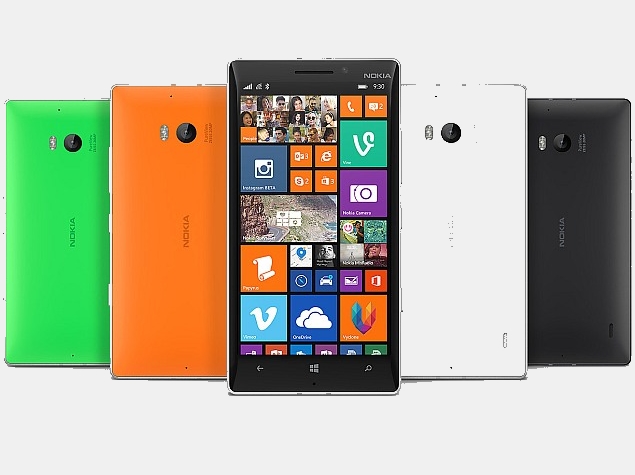
However, thanks to the latest images leaked from China by tipster “NokiBar,” we do know that Nokia Lumia 830 will be available for purchase in multiple color options, including green, orange yellow and white (gray?).

From previous leaks we have also learned that the unannounced Windows Phone handset will go on sale in the United States at three major carriers: AT&T, T-Mobile and Verizon Wireless.

The bad news is that we don’t know whether or not the Lumia 830 will be available in the United States at all carriers mentioned earlier, around the same timeframe. 

Usually, new smartphones are not launched by US operators at the same time, so there’s a very slim chance that Lumia 830 will go on sale at AT&T, T-Mobile and Verizon on the same day.

Thursday, July 10, 2014

Nokia Lumia 930 Goes on Sale Worldwide; Listed as 'Coming Soon' in India

nokia_lumia_930_conversations_ndtv.jpg
Microsoft on Monday has announced the availability of its recently unveiled Lumia 930. Priced at $599 (approximately Rs. 35,800), the sales of Lumia 930 will begin this week in Asia, Europe and the Middle East. The company also said that "further rollout throughout the world (except the US) will continue over the coming weeks."
The Lumia 930 was first unveiled in April at Microsoft's Build 2014 conference along with the Lumia 630 and Lumia 635.
The smartphone is already listed on various online retailers (Buy Nokia Lumia 930 from Flipkart, Infibeam, HomeShop18) in India without price.
The Nokia Lumia 930 features single-SIM support and runs Windows Phone 8.1 out-of-the-box. It features a 5-inch full-HD (1080x1920 pixel) ClearBlack OLED display with a pixel density of 441ppi. The display boasts of a Gorilla Glass 3 screen, the 'Super Sensitive Touch' feature, and 'a near 180-degree viewing angle'. The Lumia 930 is powered by a 2.2GHz quad-core Qualcomm Snapdragon 800 SoC coupled with 2GB of RAM, and 32GB of built-in storage.
It sports a 20-megapixel PureView camera with dual-LED flash, which has optical image stabilisation (OIS) and Carl Zeiss optics. A front-facing 1.2-megapixel wide-angle camera is onboard as well, apart from four directional microphones and integrated Dolby Surround Sound. The Nokia Lumia 930 comes in 32GB of built-in storage (additional 7GB free OneDrive cloud storage), but there is no expansion option for microSD card.
Various connectivity options on the Lumia 930 include Wi-Fi, Wi-Fi direct, Bluetooth 4.0, NFC, Micro-USB, 3G and LTE. The Lumia 930 runs on a 2420mAh battery which is rated for up to 21.7 hours of 2G talk time and 17.9 hours of 3G talk time. Other than that the Lumia 930 smartphone also boasts of built-in wireless charging. It measures 137x71x9.8 mm and weighs 167 grams.
Featuring an aluminium frame with metallic accents, and a curved polycarbonate back, the smartphone comes in Bright Orange, Bright Green, Black and White colours. The Nokia Lumia 930 comes with OneDrive, MS Office, Nokia Camera, MixRadio and HERE Maps, as well as specific imaging apps, such as Nokia Camera, Nokia Storyteller, Nokia Creative Studio and Nokia Refocus, pre-installed.

Sunday, June 29, 2014

HP Envy 17-J102TX Leap Motion Touchsmart SE Review 'A POWERFUL BEAST'


Our Verdict


  • We are sure that you would have already looked at the specifications sheet of the HP Envy 17 Leap Motion Edition notebook. If you haven’t, let us summarize the notebook for you in one word - powerful. Add to it, the integrated motion sensor, and you have a machine that could very well be designed for the future! But, is this the machine for you?
    Build & Design: More of the same good old....
    Straightaway, one thing is clear - the 3.4kg machine is meant as a desktop replacement, and having to lug it around on a regular basis, probably isn't the most comfortable activity . Add the massive 17.3-inch screen, and what you have is a machine that could be equally adept with most kinds of usage scenarios thrown at it.
    The design and looks of the ENVY 17 are very similar to the ENVY 15 we reviewed recently. HP’s design philosophy of minimalism and straight lines continues, with a greater focus on metallic colours. Happily for us, that means a shift away from the glossy and reflective colours that adorned HP laptops for quite a while, a couple of generations back. The materials used and the quality of the finish is top notch.
    When looked at from the side, the HP ENVY 17 gives an impression that it is thinner on the near side, and thicker towards the back. However, because of the black coloured underside, that is pretty much a visual trickery - the thickness is relatively the same throughout. Port placement is traditional; spread across both side spines of the keyboard deck.
     
     
    Leap Motion: Neat feature, not many apps to use it with though
    San Francisco based Leap Motion Inc. has been making sensors for PCs and Macs for quite some time now, and you can buy them for any existing Windows or Mac machine for just under $70. But, the ENVY 17 is the first machine to integrate the sensor within the existing parameters of the notebook.
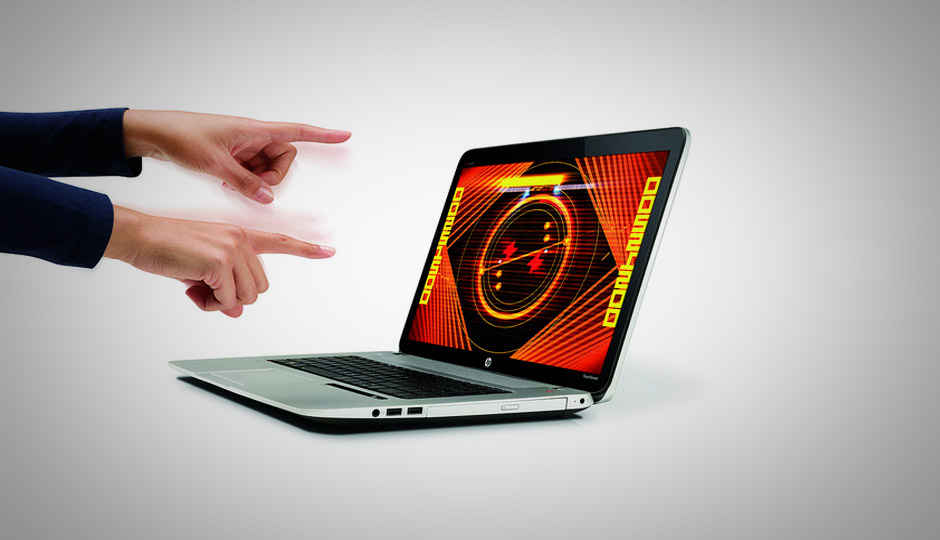
    The sensor is seated in what is essentially a strip that sits beneath the keyboard. It uses two cameras and three LEDs to track your hand’s movements -- up, down and across. This integration is considerably smaller than the standalone version that Leap Motion sells, which is what made the integration within the laptop possible.
    We installed the New York Times app from Leap Motion’s Airspace Store, just to see how well this feature works, and the experience was rather neat. The default calibration did not pose any issues, and the detection range is wide enough (and vertically high enough) to enable usage without having to constantly bother about staying with the sensor’s possible range. In fact, if the hand gets too close to the sensor, chances are the response will be iffy. Also, the Leap Motion sensor detects ambient light sources, and compensates for that. For page scrolling (in this particular app), both vertically and horizontal swipes, the response was smooth and consistent. However, the cursor is a tad finicky, and doesn’t like to remain at one place.

    Display: With great size comes great brightness!
    The 17.3-inch touchscreen is not the IPS panel that we had hoped for, but an AUO one with a 1920x1080 pixels resolution. The plastic layer in front of the display is much stiffer (thicker, if that word explains it better) than the ones seen on most laptops till now. Press down hard at any point, and the pressure resistance advantage is more than evident. Unfortunately, the panel is still extremely reflective, and unless the brightness levels are turned up, there will always be some discomfort with the ambient objects reflecting back off the screen. Thankfully, the native brightness is more than adequate. In the brightness text, this display clocked 1501 lux, which is the highest among all laptop screens we have tested so far. Colours look quite rich, and the native brightness is amongst the highest across all laptops. However, since we have not tested a display size similar to this in the recent past, it will be inaccurate to compare this to a 15.6-inch or smaller display with the luxmeter test reading. 
    Keyboard: Old bottle. Not the exact same old wine
    On the face of it, HP’s notebook keyboards are perhaps one of the better ones across all Windows laptops. The island design, as HP calls it, is the closest that this category of laptops has come to the good old Apple MacBook. On the ENVY 15 and the smaller notebooks launched in the recent past, the keyboard has been brilliant - easy to get used to, sharp response and consistent enough for quick typing. The keyboard on the ENVY 17 Leap Motion does all the things, well almost. Except two things - the key travel is a tad too much and the response is a tad softer than what we have become used to. Spacing and key size is good, and the number pad is something that can be afforded because of the extra real estate space. Again, the travel and soft response issue is nothing that one cannot get used to, because once you do,  it will become a norm for your fingers. 
     
    Performance: A proper beast
    This massive beast packs in a 4th Generation Intel Core i7-4702MQ clocking at 2.2GHz and Turbo Boost takes it up to 3.2GHz. This processor has a slightly less fashionable TDP rating at 37 Watt (in an era when 15W and lesser is considered as healthy), and the HD 4600 integrated graphics tag along. HP pairs this with 8GB of RAM and a 1TB hard drive. The graphics capabilities have been given a major boost as well, with the Nvidia GeForce GT 750M, the 28nm Kepler series GPU with 4GB of dedicated memory, in switching mode with the Intel HD 4600 integrated graphics.

    With a top of the line CPU and an upper mid-range GPU waiting to be unleashed, the expectations from the ENVY 17 Leap Motion are pretty much of a blazing performance. Straight off, the Core i7-4702MQ processor makes an attempt to be politically correct, by bringing down the TDP to 37 watts, compared to the Core i7-4700MQ processor with the TDP at 47 watts.

Thursday, June 19, 2014

Spyrus Reveals World's First 256 GB Windows to Go Flash Drives

If you want to be able to boot Windows from any computer, there's a really nifty asset in Windows 8 that lets you do it off removable storage devices. Removable media needs to be certified for it though, which is why Spyrus made sure to say loud and clear that its latest flash drives have this benefit.

Normally, for Windows, any operating system really, to launch, it has to be installed on the primary storage drive of a computer. That's not all that great when the OS fails somehow though.

Also, maybe you're the type of person that has to switch computers often, or 
travelsDescription: http://images.intellitxt.com/ast/adTypes/icon1.png a lot and would like to always have their own desktop settings and data wherever they go.

To allow that, Microsoft included the Windows to Go capability in Windows 8, which enables the OS to be installed on a
flash driveDescription: http://images.intellitxt.com/ast/adTypes/icon1.png, or USB HDD or SSD.

The removable media have to be specifically made with it in mind, though, to allow the BIOS to see them as boot drives and everything.

Sure, in 
theoryDescription: http://images.intellitxt.com/ast/adTypes/icon1.png, you could just fiddle with the BIOS and use Windows to make a bootable flash drive anyway, as long as there is enough space.

Nevertheless, when a flash drive is meant to be used as a Windows to Go device, companies usually mention it specifically. Like Spyrus did for the Portable 
WorkplaceDescription: http://images.intellitxt.com/ast/adTypes/icon1.png, Secure Portable Workplace, WorkSafe, and WorkSafe Pro SSDs.

Which brings us to today's news: Spyrus has added the 
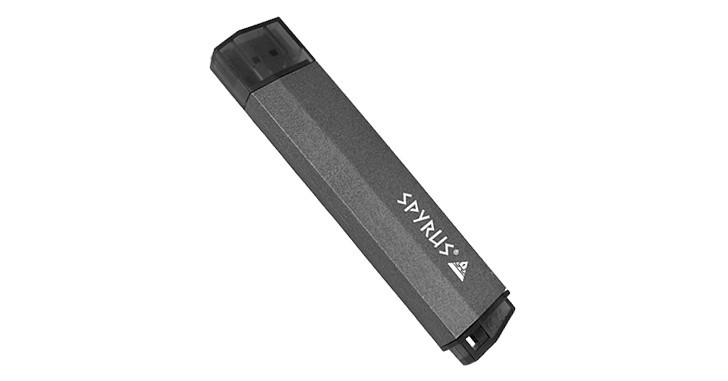
capacityDescription: http://images.intellitxt.com/ast/adTypes/icon1.png of 256 GB to its collection. And don't let the “portable SSD” description fool you. These are flash drives, through and through. USB 3.0 sticks with superior security, layered hardware and software encryption.